Sandbox Refresh
Pre-Refresh Preparation
Collect Preservation Requirements
Notify all stakeholders to provide a comprehensive list of items they want to preserve during the sandbox refresh:
- Documents
- Profiles
- External client applications
- Permission Set Groups
- Any other customizations or configurations
Create Inventory Documentation
Create a comprehensive Excel spreadsheet documenting all items collected from stakeholders. This will serve as a reference guide throughout the refresh process and for post-refresh verification.
During Refresh
Create Public Group
Create a public group that includes all organization members.
Users who are not part of the public group will not be able to access the sandbox after refresh. This must be completed before sandbox initialization.
Verify SSO Configuration
Ensure that Single Sign-On (SSO) is properly configured before the refresh completes. Verify the following:
- SSO metadata is correctly loaded
- Identity provider (IdP) settings are accurate
- Certificate and endpoint configurations are valid
Contact ITS security if these are not upto date.
Post-Refresh
Follow Post-Refresh Video Tutorial
Flow Configuration
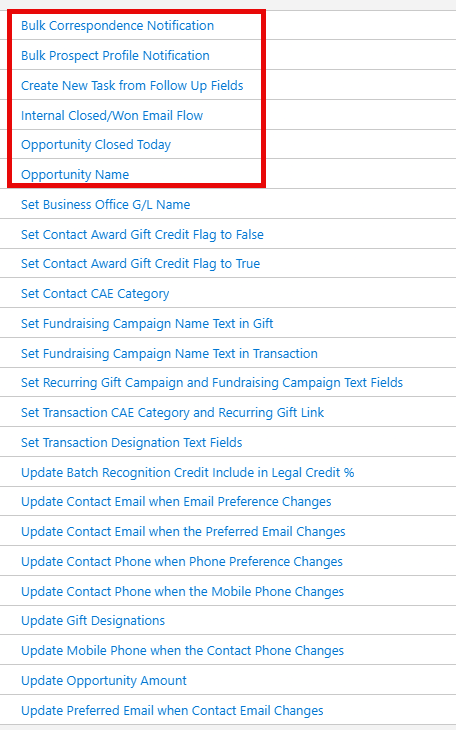
How to find the flows is a part of the video linked above. The flows in the red box are not necessary to activate. The rest must be activated.
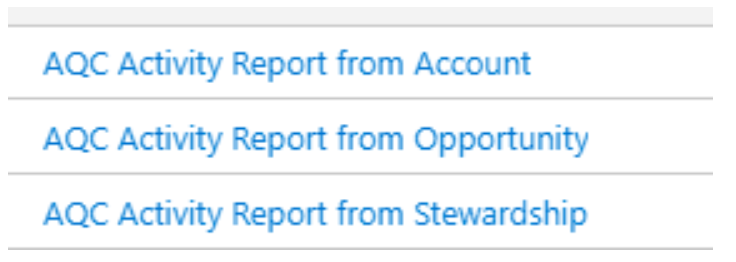
Additionally, please ensure these flows are active. They are not part of the managed package.
User Access Troubleshooting
If users cannot access the sandbox from their accounts, follow these steps:
Install Apsona
Download and install the Apsona application suite, find specific links here.
Consultants recommended installing the Dedupe and Match Add-on. Instructions can be found here.
Configure Profiles
Configure the following profiles based on their specific requirements:
Airflow Connect Profile
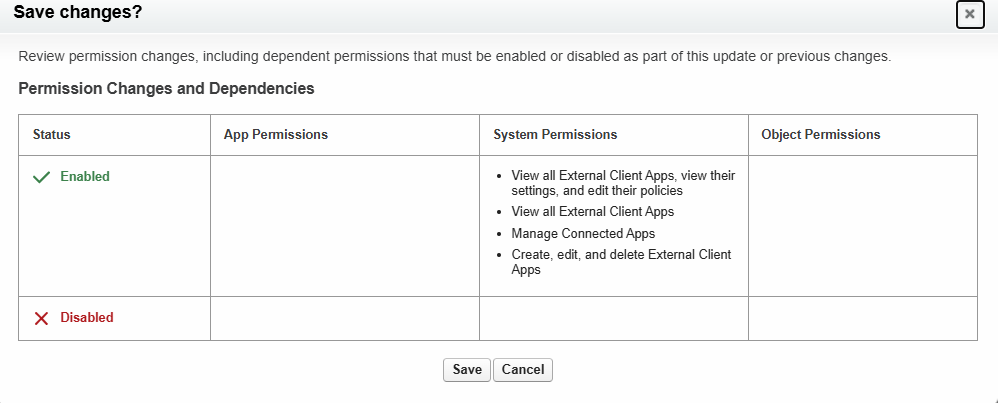
The screenshot below summarizes the system permissions to be enabled for this profile. Refer to the Connecting Apache Airflow to Salesforce within the Summer Internship Project book for specification details.
Apsona Reporter Profile
**Required Connections:**
- [SPECIFY REQUIRED CONNECTIONS HERE]
Recreate Permission Set Groups
Use this excel spreadsheet (recommendations of consultants) to recreate the permission groups/