Users who are not part of the public group will not be able to access the sandbox after refresh. This must be completed before sandbox initialization.
#### Verify SSO Configuration Ensure that Single Sign-On (SSO) is properly configured before the refresh completes. Verify the following: - SSO metadata is correctly loaded - Identity provider (IdP) settings are accurate - Certificate and endpoint configurations are valid Contact ITS security if these are not upto date. # Post-Refresh #### Follow Post-Refresh Video Tutorial [Sandbox Activation Tasks](https://urldefense.com/v3/__https://uri0.sharepoint.com/:f:/r/sites/URIFAdvancementRMImplementationProject/Shared*20Documents/Recordings/2026.07.09*20-*20Sandbox*20Activation*20Tasks?csf=1&web=1&e=wPzWVH__;JSUlJSU!!Jh1S!noAEzp9PawzqkuxIlonDwkhYQVl-T9a9Xbg1OtvbqseePl2V4znFkdVrEveN9fhblHh8S3nzD7gGTXo__swTM1hTJTZa%24) #### Flow Configuration How to find the flows is a part of the video linked above. The flows in the red box are not necessary to activate. The rest must be activated. [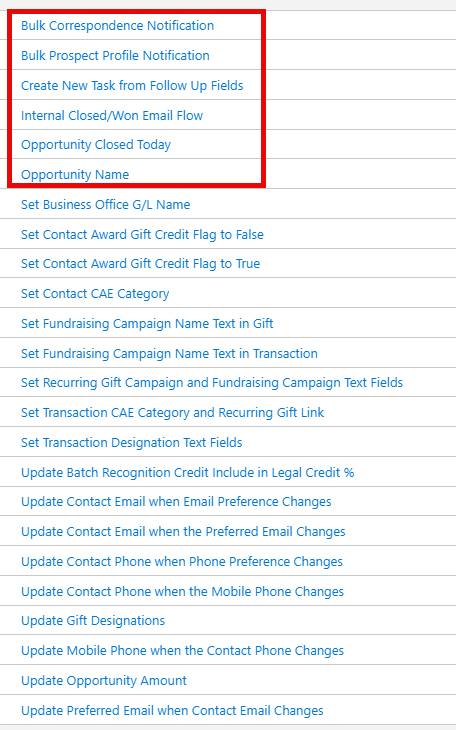](https://bookstack.foundation.uri.edu/uploads/images/gallery/2026-07/E6YEwhCFQ1rLbUyN-adobeexpressphotos-afbd4f27537a46479fb24e1ffdf4ed1e-copyedited.png) Additionally, please ensure these flows are active. They are not part of the managed package. [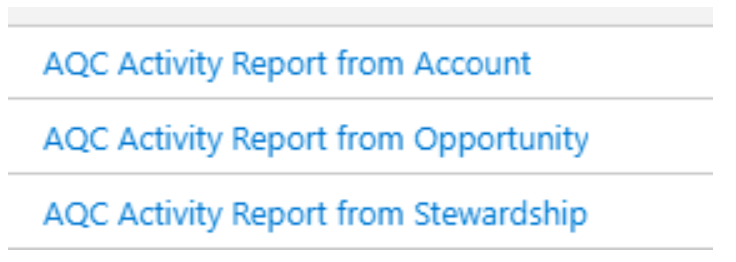](https://bookstack.foundation.uri.edu/uploads/images/gallery/2026-07/vuDDSBR1pBEkir6T-image.png) #### User Access Troubleshooting If users cannot access the sandbox from their accounts, follow these steps: 1\. Navigate to \*\*Setup > Users\*\* 2\. Find the user account and click \*\*Unfreeze\*\* 3\. Remove the \*\*.invalid\*\* suffix from their email address 4\. Check the \*\*Generate New Password\*\* box 5\. Click \*\*Save\*\* 6\. The user will receive an email with instructions to create a new password #### Install Apsona Download and install the Apsona application suite, find specific links [here.](https://drive.google.com/file/d/1JnpIISTnD4i4ixINUkUkr97a73TFepK6/view)Consultants recommended installing the Dedupe and Match Add-on. Instructions can be found [here](https://www.apsona.com/docs/help-and-support/dedupe/).
#### Configure Profiles Configure the following profiles based on their specific requirements: ##### Airflow Connect Profile The screenshot below summarizes the system permissions to be enabled for this profile. Refer to the [Connecting Apache Airflow to Salesforce](https://bookstack.foundation.uri.edu/books/summer-internship-program-2026/page/connecting-apache-airflow-to-salesforce) within the Summer Internship Project book for specification details. [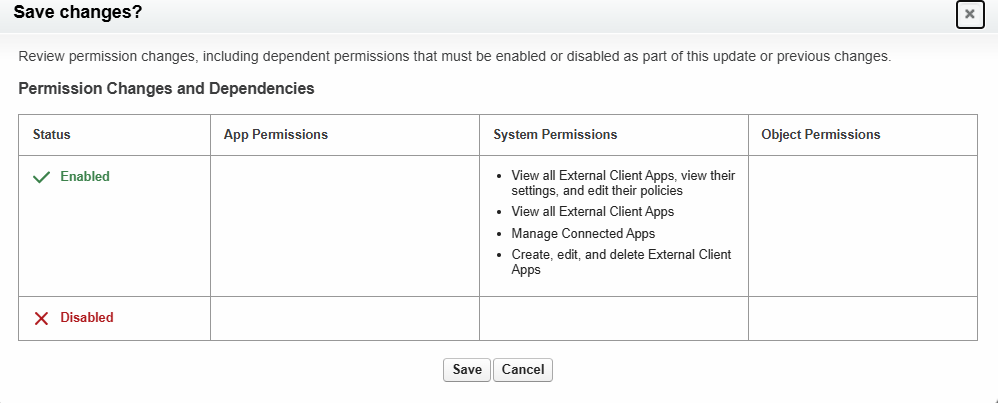](https://bookstack.foundation.uri.edu/uploads/images/gallery/2026-07/mhBckorvC6EBormw-image.png) ##### Apsona Reporter Profile \*\*Required Connections:\*\* \- \[SPECIFY REQUIRED CONNECTIONS HERE\] #### Recreate Permission Set Groups Use [this excel spreadsheet](https://docs.google.com/spreadsheets/d/1TEUkCvqEbUHWrdM8WFo_eDivMFpcueE7/edit?usp=sharing&ouid=105877288353716812626&rtpof=true&sd=true) (recommendations of consultants) to recreate the permission groups/