
Salesforce DAGs
Overview
The DAGs produced in this section were some of the first DAGs made during the internship. The DAGs here are made for Contact objects and Account objects, which are native to Salesforce. The DAGs originally were made during May-June of 2026 and intended for use in the Sandbox environment which only used test data. As of July 31st, 2026, the DAGs are being refit to function in a production environment.
The general structure of each DAG is the following, each DAG follows an "ETL" or Extract, Transfer, Load design. Since PostgreSQL was chosen as one of the endpoints during the internship, data is fed between PostgreSQL or Salesforce and then fed into the intermediary service of Airflow. In Airflow, the data is "transformed" in whatever manner is necessary, and then is fed to the other service. If data was taken from PostgreSQL, then it would typically flow back out to Salesforce, and if data was taken from Salesforce it would generally go back to PostgreSQL.
Many of the DAGs contain their own respective documentation, however additional documentation is added here such that they can be understood at a higher level and more context can be given with respect to their uses in Salesforce.
Visual Studio Code AWS Extension
The Visual Studio Code (VSC) extension for AWS makes modifying and creating existing DAGs extremely simple. The utility allows users to create, delete, upload, and modify files in AWS' file hierarchy as if it were a normal file explorer in VSC. For example consider the current working directory for DAGs:
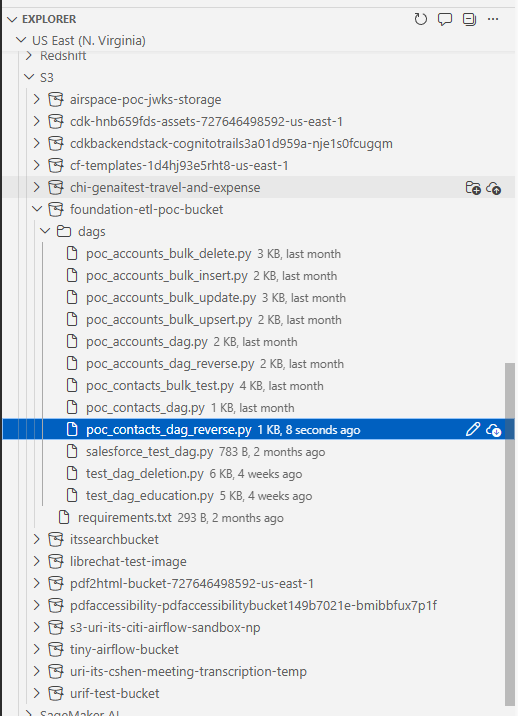
More information about the plugin can be found here. Installing the plugin in VSC and working with it is relatively simple. In VSC, the extension can easily be found by searching "AWS" into the extension marketplace. The top result "AWS Toolkit" should be installed.
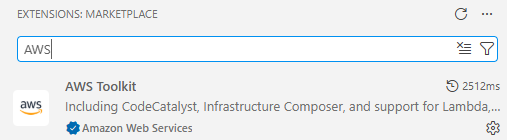
Once installed, there will appear an "AWS" icon on the bottom left sidebar of VSC. Click on it.
Bulk API
Test Connection DAG
This DAG simply tests that there is an existing Airflow connection and is entitled "salesforce_test_dag". This DAG is useful since it simply reads from Salesforce, which proves that Salesforce is connected without making any unexpected modifications to it or PostgreSQL. In the event that a connection must be re-established between Airflow and Salesforce, this DAG can be used to test that the connection is valid safely.
The DAG does not follow the ETL structure as it is just used to verify that a connection exists.
from datetime import datetime
from airflow.decorators import dag, task
from airflow.providers.salesforce.hooks.salesforce import SalesforceHook

@dag(
    dag_id="salesforce_test_dag",
    schedule=None,
    start_date=datetime(2026, 1, 1),
    catchup=False,
)
def salesforce_test_dag():

    @task
    def test_connection():
        hook = SalesforceHook()

        # Test with a simple query
        result = hook.make_query("SELECT Id, Name FROM Account LIMIT 5")

        print(f"Successfully connected to Salesforce!")
        print(f"Retrieved {len(result['records'])} accounts")

        for record in result["records"]:
            print(f"  - {record['Name']}")

        return result["records"]

    test_connection()

salesforce_test_dag()=6.3.0
Contact DAGs
Contact objects in Salesforce represent an individual associated with a business account, and as the name would suggest, contains that person's name, phone number, email address, and other useful fields by which that person can be contacted.