
Post-Refresh
Follow Post-Refresh Video Tutorial
[VideoSandbox LinkActivation - INSERT LINK HERE]Tasks
Flow Configuration
SomeHow to find the flows requireis activationa whilepart others must remain deactivated. Refer toof the attachedvideo screenshotlinked forabove. detailed guidance on whichThe flows in the red box are not necessary to activate. The rest must be activated.
**Note:**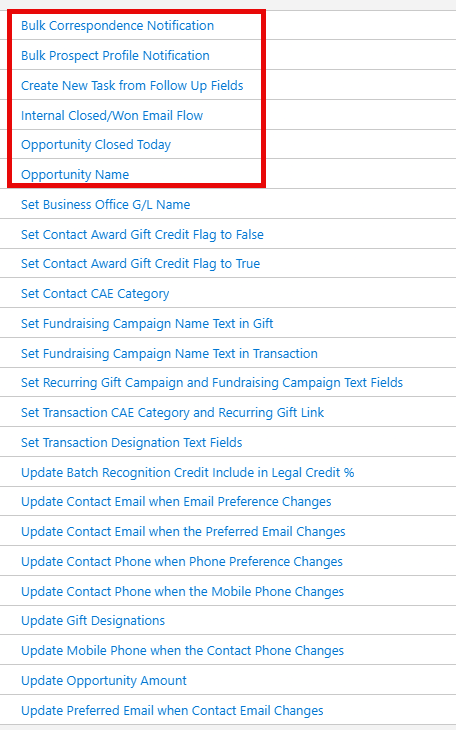
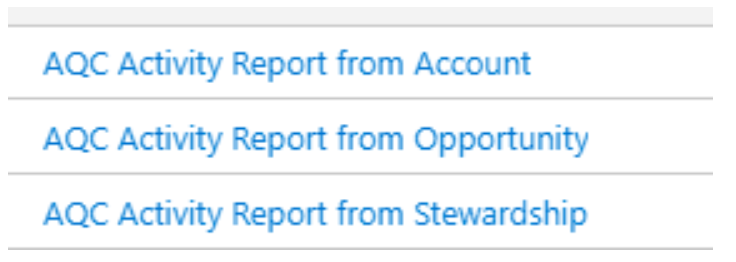
Additionally, please ensure these flows are active. They are not part of the flowmanaged configurationpackage.
User Access Troubleshooting
If users cannot access the sandbox from their accounts, follow these steps:
Install Apsona
Download and install the Apsona application suite:suite, find specific links here.
-Consultants [Apsonarecommended Maininstalling App - INSERT LINK]- [Apsonathe Dedupe and Match -Add-on. INSERTInstructions LINK]can be found here.
Configure Profiles
Configure the following profiles based on their specific requirements:
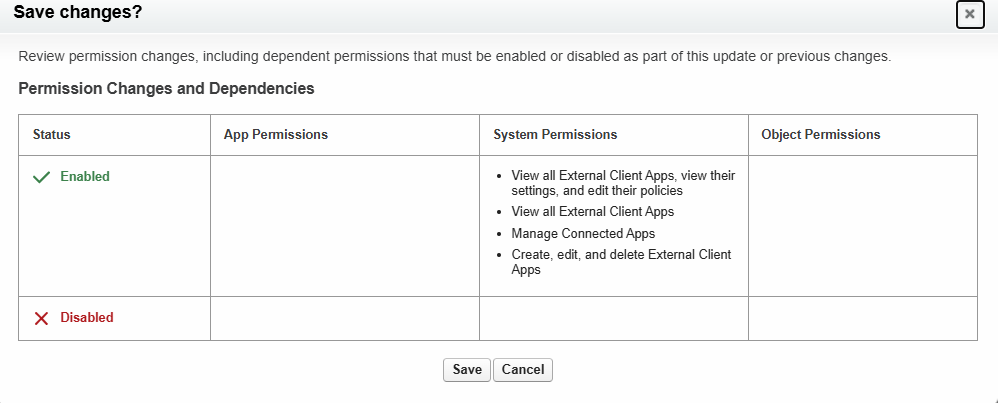
Airflow Connect Profile
The screenshot below summarizes the system permissions to be enabled for this profile. Refer to the [Connecting Apache Airflow Documentationto PageSalesforce -within INSERTthe LINK]Summer Internship Project book for specification details.
Apsona Reporter Profile
**Required Connections:**
- [SPECIFY REQUIRED CONNECTIONS HERE]
Recreate Permission Set Groups
Use thethis Excelexcel spreadsheet created(recommendations inof the Pre-Refresh phaseconsultants) to recreate allthe permission set groups.groups/
[Link to Inventory Spreadsheet - INSERT LINK]